VicLovan.com
VicLovan.com fast-list Contact Me Site Search
Downloads and Tips! How to backup Windows computers ready for reloading Updating to Windows 10 from Windows 7 How to create a Windows 10 Local Account during a clean install How to share Folders and Files Online Email and related Restart the Print Spooler Computer diagnostics and upgrade info Slow startup - Black Screen - Windows 10 Shopping suggestions Dual Monitors- Once you go dual, you'll never go back! Using WinAmp Visualizations as the Windows Desktop background! Lighten a photo the "right" way using Paint.NET! Google Casting from a desktop AntiVirus Removal Tools links - From ESET
Mobile Devices How to back up your Android device. Mobile Device Video Phone Storage and Backup
Client help here! About Disclaimer
VicLovan News!
VicLovan.com Downloads and Tips Downloads and Tips! How to backup Windows computers ready for reloading Updating to Windows 10 from Windows 7 How to create a Windows 10 Local Account during a clean install How to share Folders and Files Online Email and related Restart the Print Spooler Computer diagnostics and upgrade info Slow startup - Black Screen - Windows 10 Shopping suggestions Dual Monitors- Once you go dual, you'll never go back! Using WinAmp Visualizations as the Windows Desktop background! Lighten a photo the "right" way using Paint.NET! Google Casting from a desktop AntiVirus Removal Tools links - From ESET fast-list Mobile Devices Mobile Devices How to back up your Android device. Mobile Device Video Phone Storage and Backup Contact Me Client Help and About Client help here! About Disclaimer Site Search
VicLovan.com
Tech help and how to
Posts VicLovan News!

Yahoo - Why am I receiving an error when I send mail from Outlook, Outlook Express, Thunderbird, Mac Mail, etc.?

Why am I receiving an error when I send mail from Outlook, Outlook Express, Thunderbird, Mac Mail, etc.? via Why am I receiving an error when I send mail from Outlook, Outlook Express, Thunderbird, Mac Mail, etc.?.

Last Updated: June 26, 2009

If you received an error message (553) while sending an email via Outlook, Thunderbird or other external email client, your alternate or Yahoo! Mail address is not verified. To properly use the Yahoo! SMTP service, please follow these instructions.

Click here if you are using the all-new Yahoo! Mail.

  1. Access Yahoo! Mail by logging in with your ID and password.
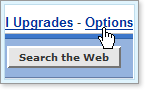
  2. Once you're logged in, click Options in the upper-right area of the page.
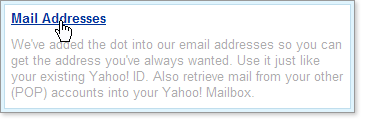
  3. Under "Management", click Mail Addresses.
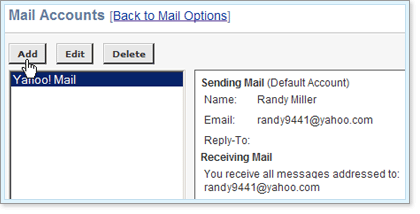
  4. Click Add.
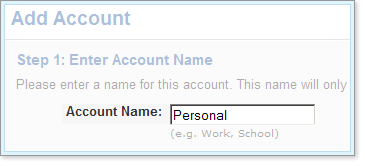
  5. In the Account Name field, enter a name for your own reference (for example, Work, School, My Domain, etc.) and click Continue.
  6. In the Name and Email fields, enter the name you want the person receiving email from this address to see, and the alternate email address you would like send mail from (we'll send a confirmation code to this email address, which you'll use to complete this setup).
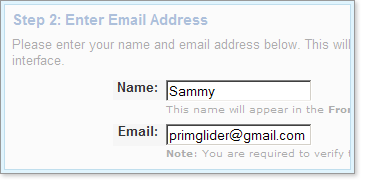
  7. Click Continue in the lower-left corner.
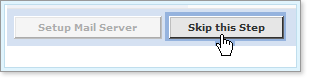
  8. Next, you'll see "Step 3 Setup Mail Server." Click Skip this Step in the lower-left corner.
  9. On the next page, click the Send Verification button. This transmits a verification email from Yahoo! Member Services to the email address you just specified. Here's the easiest way to complete your setup and start sending mail from the new address:
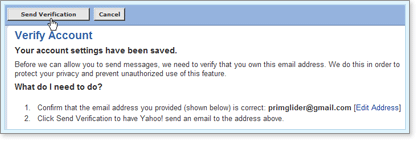
    1. Leave the "Verify Account" page open.
    2. Retrieve the email sent by Yahoo! Member Services to your alternate email address.
    3. Enter the "confirmation code" from this email into the Confirmation Code field in the "Verify Account" page in Yahoo! Mail.
    4. Click Verify Account.
    5. Sign in with your Yahoo! Password on the final page.
    6. Your alternate email address is now verified and can be used for sending emails through Yahoo! Mail or your email software.

Note: Every primary and secondary Yahoo! Mail ID can verify up to 10 alternate email addresses each.

Special notice for Outlook 2003 users: You might need to download a program update to resolve this problem. Please click here for detailed instructions.

How To and Tips, Uncategorized, Yahoo!vic lovanOctober 10, 2009Confirmation Code From, Email Client, Express Mail, Last Updated June, Mac Mail, Mail Account, Mail Address, Mail Express, Mail Server, Mail Yahoo, New Mail, Outlook Mail, Send Mail, Sending Mail, Setup Mail, Verification Button, Yahoo Mail, Yahoo Member Services, Yahoo Password, Yahoo Smtp1 Comment
Facebook0 Twitter 0 Likes
Previous

Yahoo! POP Email Settings

Google and Gmail, How To and Tips, Yahoo!vic lovanOctober 11, 2009Account Settings, Ameritech, Connection Group, Email Account, Email Address, Email Clients, Email Service, Email Settings, Email Yahoo, Isp Names, Left Menu, Menu Bar, Outgoing Server, Pop Email, Pop Server, Port 995, Radio Button, Secure Connection, Server Name, Server Pop, Server Settings, Server Smtp, Server Window, Smtp Server, Snet, Thunderbird 2, Thunderbird 3, Yahoo, Yahoo Email
Next

KU wins the NCAA College Basketball Championship! 2008.04.07

Fun stuff - time killersvic lovanOctober 8, 2009Blank Space, College Basketball Championship, Cstv, Game, Ku, Ku Basketball, Mbb, Ncaa, Ncaa Basketball, Ncaa Championship, Ncaa College Basketball, Rock Chalk, Space Rock, Sports, Wins
618-767-6728 vic@viclovan.com
Google +FacebookTwitterInstagram

Powered by Squarespace